Just like the userspace, the kernel also has a couple of security features.
SMEP
SMEP stands for Supervisor Mode Execution Prevention.
SMEP is similar to NX in the userspace.
It prohibits userspace code execution in the kernel.
If SMEP isn’t set, you can still execute shellcode and can overwrite the RIP.
However is it’s enabled, injecting shellcode will lead to a kernel panic.
When SMEP is enabled, overwriting the RIP will likely not lead to a privilege escalation.
SMEP can be enabled by passing the passing +smep to the -cpu option in qemu.
-cpu kvm64,+smep
You can also check /proc/cpuinfo instead as well.
cat /proc/cpuinfo | grep smep

If the 20th bit of the CR4 register is on, SMEP will be enabled.
Since CR4 is the 4th control register, we’ll need to know what CR(Control Registers) are first.
Here’s the definition from the intel manual and wikipedia.
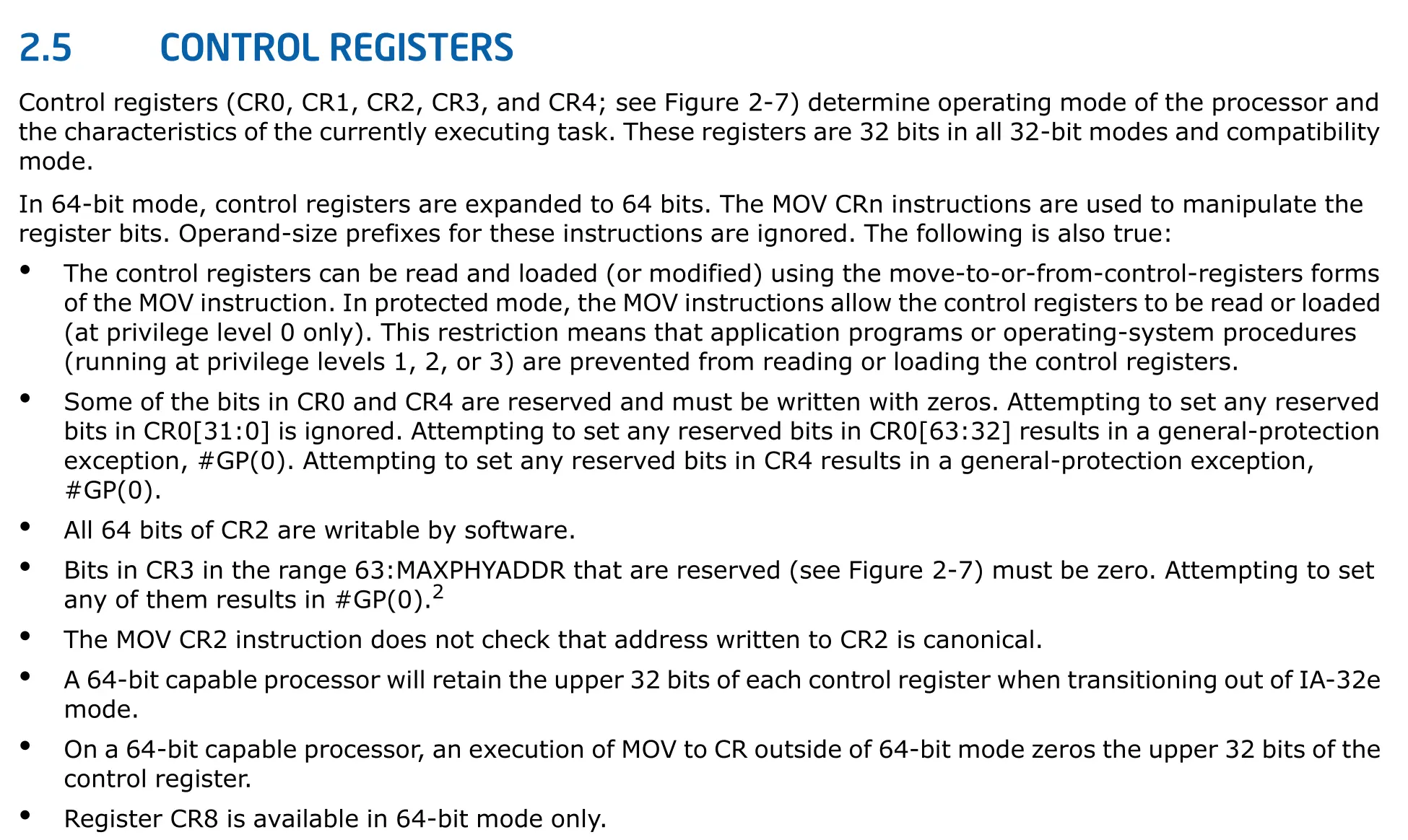
It’s still cryptic to me even after reading it.

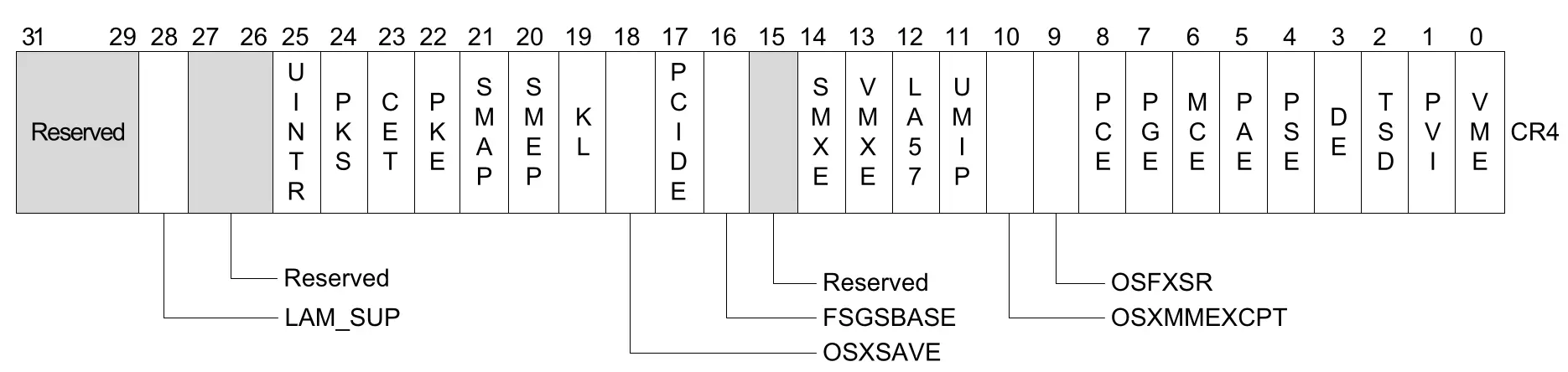
I also think ptr-yudai made a typo, he said that turning the 21st bit of the CR4 register enables SMEP. (CR4レジスタの21ビット目を立てるとSMEPが有効になります。).
However, as we saw from the manual it’s actually the 20th bit.
SMAP
SMAP stands for Supervisor Mode Access Prevention.
SMAP prohibits the kernel from reading or writing memory from the userspace.
In order to read or write data from the userspace the kernel must use the copy_from_user or copy_to_user functions.
Why did the kernel developers prohibit the kernel from reading or writing userspace data?
In fact, the kernel has a higher privilege than the userspace.
Although ptr-yudai isn’t sure about the historical reasons on why the kernel is prohibited read or write access to the userspace.
He believes there are 2 rasion d’etres.
The first purpose is to prevent stack pivots.
In the previous example where SMEP was enabled, even if we can overwrite the RIP, we couldn’t trigger the shellcode.
However, since the kernel has more than 40 million lines of code there will always be a ROPgadget.
mov esp, 0x12345678; ret;
Regardless of the ESP value when that instruction gets executed RSP will hold 0x12345678.
The lower 32 bit values can be allocated from the mmap syscall in the userspace, which allows us to create a ROPchain as long as we can overwrite the RIP.
However if SMAP is enabled, the mmaped data from the userspace which is the ropchain cannot be accessed by the kernel.
Therefore when the ret instruction in the stack pivot gets executed the kernel will throw a kernel panic because it tried to read the return address from the userspace.
The second benefit SMAP provides is that it can prevent simple bugs in the kernel.
Below is a kernel bug that can be found in device drivers, etc.
char buffer[0x10];

static long mydevice_ioctl(struct file *filp, unsigned int cmd, unsigned long arg) {
  if (cmd == 0xdead) {
    memcpy(buffer, arg, 0x10);
  } else if (cmd == 0xcafe) {
    memcpy(arg, buffer, 0x10);
  }
  return
}
By using the memcpy function it reads and writes the global variable buffer.
int fd = open("/dev/mydevice", O_RDWR);

char src[0x10] = "Hello, World!";
char dst[0x10];

ioctl(fd, 0xdead, src);
ioctl(fd, 0xcafe, dst);

printf("%s\n", dst); // --> Hello, World!
If you’re accustomed to programming in the userspace, there doesn’t seem to be any critical issues.
However, if SMAP isn’t enabled the function calls like below are allowed.
ioctl(fd, 0xdead, 0xffffffffdeadbeef);
Although 0xffffffffdeadbeef isn’t a valid memory address in the usersapce, what if there was some secret data stored in that address?
The function call would read the secret data.
Without checking the memcpy used in the userspace the kernel is able to read and write arbitrary addresses.
Honestly, I don’t understand how the arbitrary read and arbitrary write was allowed.
Maybe it’s because I don’t have hands on knowledge on the ioctl syscall.
SMAP can be enabled by passing qemu the +smap flag to the -cpu option.
-cpu kvm64,+smap
Checking /proc/cpuinfo works as well.
cat /proc/cpuinfo | grep smap
To enable smep or smap you must pass it like +smep or +smap without the +, qemu won’t enable the security features.
If the 21st bit of the CR4 register is on, SMAP will be enabled.

Most of the time, SMEP and SMAP are both enabled like bread and butter.
I also think ptr-yudai made another typo, he said that turning the 22nd bit of the CR4 register enables SMAP. (CR4レジスタの22ビット目を立てるとSMAPが有効になります)
Maybe, ptr-yudai counted from 1 instead of 0? not sure how he got those numbers.
However, if you check the manual it’s actually the 21st bit.
KASLR / FGKASLR
KASLR is a kernel version of ASLR(Address Space Layout Randomization).
Just like ASLR in the userspace the address would get randomized in the kernel or the device driver’s code or data section.
KASLR will only take place initially during the first boot, since the kernel gets booted only once initially.
Leaking an memory address of a function or data will allow you to calculate the base address.
From 2020 and later an upgraded version of KASLR, FGKASLR (Function Granular KASLR) came out.
According to ptr-yudai when he wrote the pawnyable series in 2022 it FGKASLR wasn’t enabled by default.
It still doesn’t seem to be the default randomization method in 2026.
FGKASLR randomizes each function addresses in the linux kernel.
Even if we can leak an address of a function, we can’t find the base address.
However since FGKASLR doesn’t randomize sections such as the .data section, we are able to calculate the base address if a leak is given.
One last point is that the kernel addresses are shared across the entire kernel space.
For example, even if one device driver is unexploitable due to KASLR, if we can leak the address with another device driver it becomes exploitable.
KASLR can be turned off by qemu, by passing nokaslr to the -append option.
-append nokaslr
KPTI
All the security features enabled in the kernel introduced before also exist in the userspace.
However, I think KPTI is the only one security feature that’s exclusive to the kernel.
In 2018, Intel CPU’s had a side channel attack called Meltdown.
Meltdown was a critical bug that allowed users to read the kernel memory with userspace privileges.
KPTI short for Kernel Page-Table Isolation is a feature that mitigates the Meltdown vulnerability.
This lead to KASLR bypasses.
Nowadays, to prevent such attacks KPTI or it’s prior terminology KAISER is enabled.
A page table is used to convert virtual addresses to physical addresses.
KPTI separates the userspace page table and kernel space tables.
In most kernel exploits, KPTI will not be a problem because it’s goal is to prevent Meltdown.
However, if KPTI is enabled during a ROP there will be some problems when returning to the userspace.
KPTI can be enabled by passing pti=on to the qemu -append option.
Passing pti=off or nopti will disable KPTI.
-append "... pti=on ..."
Another way to check whether KPTI is enabled is through /sys/devices/system/cpu/vulnerabilities/meltdown.
If it returns Mitigation: PTI then KPTI is enabled.
cat /sys/devices/system/cpu/vulnerabilities/meltdown
Mitigation: PTI
If it returns Vulnerable KPTI is disabled.
I was curious if my CPU has KPTI enabled, but it doesn’t seem to have KPTI turned on.
$ cat /sys/devices/system/cpu/vulnerabilities/meltdown
Not affected
I’m not a 100% sure, but Meltdown seems to be an Intel CPU execlusive bug which currently is patched.
KADR
KADR stands for Kernel Address Display Restriction.
Recall the fact that wer were able to search for function names and symbols frm /proc/kallsyms.
We can also print various debugging info from the device drivers using the printk function.
The debugging log can you printed via the dmesg command.
To prevent leaking function addresses, data or heap sections in the kernel space the kernel has a security feature.
Although, it doesn’t seem to have an official name many ctfers refer to this as KADR.
So we’ll using that terminology as well.
Technically, this feature specifically controls how the %pK format specifier behaves in the kernel source code.
This feature can be modified by changing the values from /proc/sys/kernel/kptr_restrict.
If kptr_restrict is 0 there aren’t any constraints to revealing the addresses.
If kptr_restrict is 1 it will reveal the addresses to the user who has the CAP_SYSLOG privilege.
The CAP_SYSLOG allows the user to perform privileged syslog operations .
Read the man page for capabilities and search CAP_SYSLOG.
If kptr_restrict is 2 the kernel addresses will not be revealed regardless of the privilege.
Exploiting will be easier if KADR is disabled, because we won’t have trouble finding the kernel addresses.
Problems
ptr-yudai gave us 3 problems to solve.
- Go to the LK01 directory and read run.sh.
Check whether KASLR, KPTI, SMAP, SMEP is enabled.
#!/bin/sh
qemu-system-x86_64 \
    -m 64M \
    -nographic \
    -kernel bzImage \
    -append "console=ttyS0 loglevel=3 oops=panic panic=-1 nopti nokaslr" \
    -no-reboot \
    -cpu qemu64 \
    -smp 1 \
    -monitor /dev/null \
    -initrd rootfs_updated.cpio \
    -net nic,model=virtio \
    -net user \
	-gdb tcp::12345 #-S
As you can see from the nokaslr, nopti flags KASLR and KPTI aren’t enabled.
To enable SMAP it qemu needs the -cpu +smap flag.
In a similar manner to enable SMEP the -cpu +smep flag.
However since the the -cpu option only has qemu64 neither SMAP or SMEP is enabled.
To conclude each and every security measures from KASLR, KPTI, SMAP and SMEP are all disabled.
- Pass the flags to turn both SMAP and SMEP and check
/proc/cpuinfoto ensure they are enabled.
Turn the flags off when finished checking.
Here’s run.sh after enabling SMEP and SMAP.
-cpu qemu64,+smep,+smap \
I had some trouble grepping smep and smap.
# cat /proc/cpuinfo | grep -E "smep|smap"
flags		: fpu de pse tsc msr pae mce cx8 apic sep mtrr pge mca cmov pap
grep wouldn’t show whether SMEP or SMAP were enabled from /proc/cpuinfo.
I think it’s because the delimeters are all spaces.
Using tr and replacing the spaces to newlines and then grepping will properly show the output.
cat /proc/cpuinfo | grep flags | tr ' ' '\n' | grep -E "smep|smap"
smep
smap
Sadly it wouldn’t show the grep results in red like usual…
- Find the kernel’s base address.
The base address of the kernel is the first address from executing head /proc/kallsyms.
/ # head /proc/kallsyms
ffffffff81000000 T startup_64
ffffffff81000000 T _stext
ffffffff81000000 T _text
ffffffff81000040 T secondary_startup_64
ffffffff81000045 T secondary_startup_64_no_verify
ffffffff81000110 t verify_cpu
ffffffff81000210 T sev_verify_cbit
ffffffff81000220 T start_cpu0
ffffffff81000230 T __startup_64
ffffffff810005e0 T startup_64_setup_env
The kernel’s base address is 0xffffffff81000000.